Tratamento de erros
Os erros podem ser divididos em duas categorias: erros esperados e exceções não capturadas. Esta página mostra como tratar esses erros no seu app Next.js.
Tratamento de erros esperados
Erros esperados são aqueles que podem acontecer durante a operação normal do app, como os da validação de formulário no servidor ou de requisições que falham. Esses erros devem ser tratados explicitamente e retornados ao cliente.
Server Functions
Você pode usar o hook useActionState para tratar erros esperados em Server Functions.
Para esses erros, evite usar blocos try/catch e lançar erros. Em vez disso, modele os erros esperados como valores de retorno.
'use server'

export async function createPost(prevState: any, formData: FormData) {
  const title = formData.get('title')
  const content = formData.get('content')

  const res = await fetch('https://api.vercel.app/posts', {
    method: 'POST',
    body: { title, content },
  })
  const json = await res.json()

  if (!res.ok) {
    return { message: 'Failed to create post' }
  }
}'use server'
export async function createPost(prevState, formData) {
const title = formData.get('title')
const content = formData.get('content')
const res = await fetch('https://api.vercel.app/posts', {
method: 'POST',
body: { title, content },
})
const json = await res.json()
if (!res.ok) {
return { message: 'Failed to create post' }
}
}Você pode passar sua action para o hook useActionState e usar o state retornado para exibir uma mensagem de erro.
'use client'

import { useActionState } from 'react'
import { createPost } from '@/app/actions'

const initialState = {
  message: '',
}

export function Form() {
  const [state, formAction, pending] = useActionState(createPost, initialState)

  return (
    <form action={formAction}>
      <label htmlFor="title">Title</label>
      <input type="text" id="title" name="title" required />
      <label htmlFor="content">Content</label>
      <textarea id="content" name="content" required />
      {state?.message && <p aria-live="polite">{state.message}</p>}
      <button disabled={pending}>Create Post</button>
    </form>
  )
}'use client'
import { useActionState } from 'react'
import { createPost } from '@/app/actions'
const initialState = {
message: '',
}
export function Form() {
const [state, formAction, pending] = useActionState(createPost, initialState)
return (
<form action={formAction}>
<label htmlFor="title">Title</label>
<input type="text" id="title" name="title" required />
<label htmlFor="content">Content</label>
<textarea id="content" name="content" required />
{state?.message && <p aria-live="polite">{state.message}</p>}
<button disabled={pending}>Create Post</button>
</form>
)
}Server Components
Ao buscar dados dentro de um Server Component, você pode usar a resposta para renderizar condicionalmente uma mensagem de erro ou um redirect.
export default async function Page() {
  const res = await fetch(`https://...`)
  const data = await res.json()

  if (!res.ok) {
    return 'There was an error.'
  }

  return '...'
}export default async function Page() {
const res = await fetch(`https://...`)
const data = await res.json()
if (!res.ok) {
return 'There was an error.'
}
return '...'
}Não encontrado
Você pode chamar a função notFound dentro de um segmento de rota e usar o arquivo not-found.js para mostrar uma interface de 404.
import { notFound } from 'next/navigation'
import { getPostBySlug } from '@/lib/posts'

export default async function Page({
  params,
}: {
  params: Promise<{ slug: string }>
}) {
  const { slug } = await params
  const post = getPostBySlug(slug)

  if (!post) {
    notFound()
  }

  return <div>{post.title}</div>
}import { notFound } from 'next/navigation'
import { getPostBySlug } from '@/lib/posts'
export default async function Page({ params }) {
const { slug } = await params
const post = getPostBySlug(slug)
if (!post) {
notFound()
}
return <div>{post.title}</div>
}export default function NotFound() {
return <div>404 - Page Not Found</div>
}export default function NotFound() {
return <div>404 - Page Not Found</div>
}Tratamento de exceções não capturadas
Exceções não capturadas são erros inesperados que indicam bugs ou problemas que não deveriam acontecer no fluxo normal do seu app. Eles devem ser tratados lançando erros, que serão capturados pelos error boundaries.
Error boundaries aninhados
O Next.js usa error boundaries para tratar exceções não capturadas. Error boundaries capturam erros nos componentes filhos e exibem uma interface de fallback no lugar da árvore de componentes que quebrou.
Crie um error boundary adicionando um arquivo error.js dentro de um segmento de rota e exportando um componente React:
'use client' // Error boundaries must be Client Components

import { useEffect } from 'react'

export default function ErrorPage({
  error,
  retry,
}: {
  error: unknown
  retry: () => void
}) {
  useEffect(() => {
    // Log the error to an error reporting service
    console.error(error)
  }, [error])

  return (
    <div>
      <h2>Something went wrong!</h2>
      <button
        onClick={
          // Attempt to recover by re-fetching and re-rendering the segment
          () => retry()
        }
      >
        Try again
      </button>
    </div>
  )
}'use client' // Error boundaries must be Client Components
import { useEffect } from 'react'
export default function ErrorPage({ error, retry }) {
useEffect(() => {
// Log the error to an error reporting service
console.error(error)
}, [error])
return (
<div>
<h2>Something went wrong!</h2>
<button
onClick={
// Attempt to recover by re-fetching and re-rendering the segment
() => retry()
}
>
Try again
</button>
</div>
)
}Os erros sobem até o error boundary pai mais próximo. Isso permite um tratamento de erros granular, ao colocar arquivos error.tsx em diferentes níveis da hierarquia de rotas.
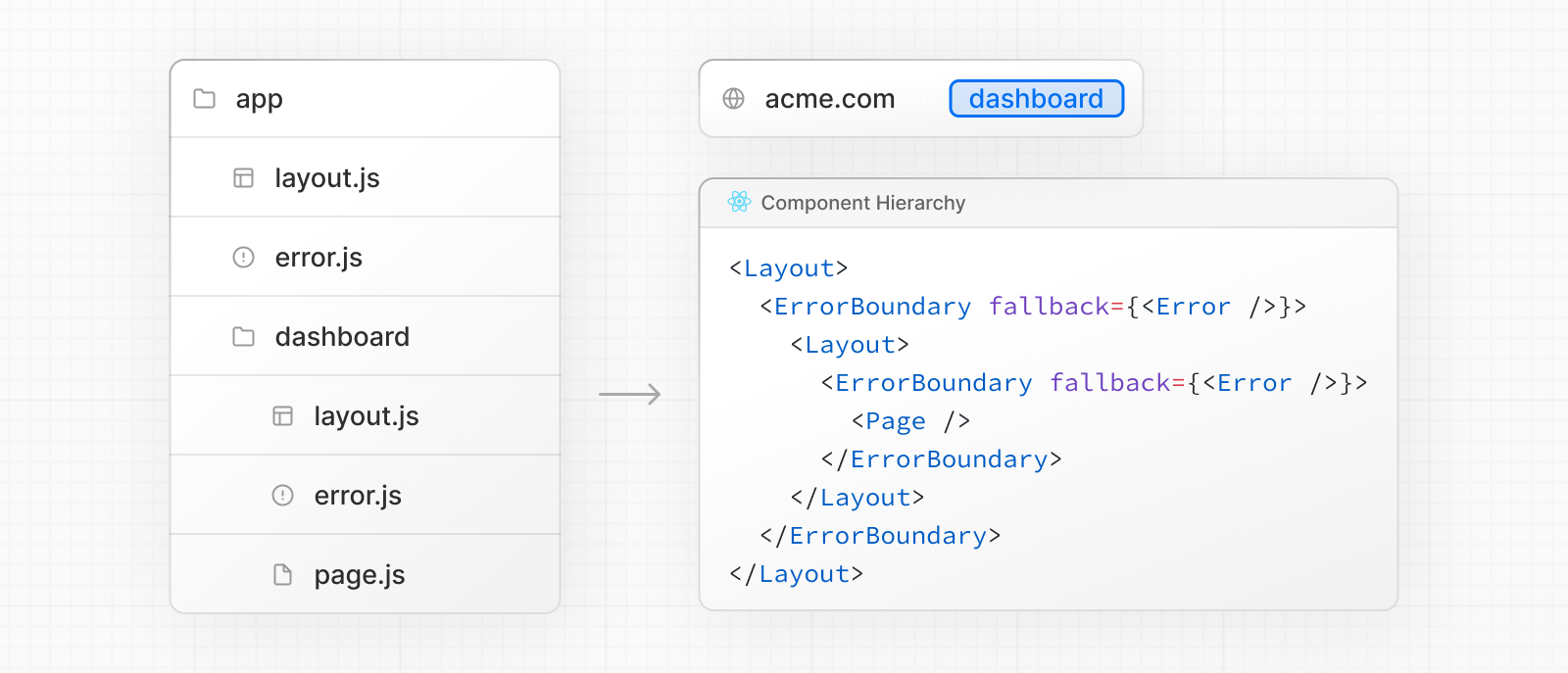
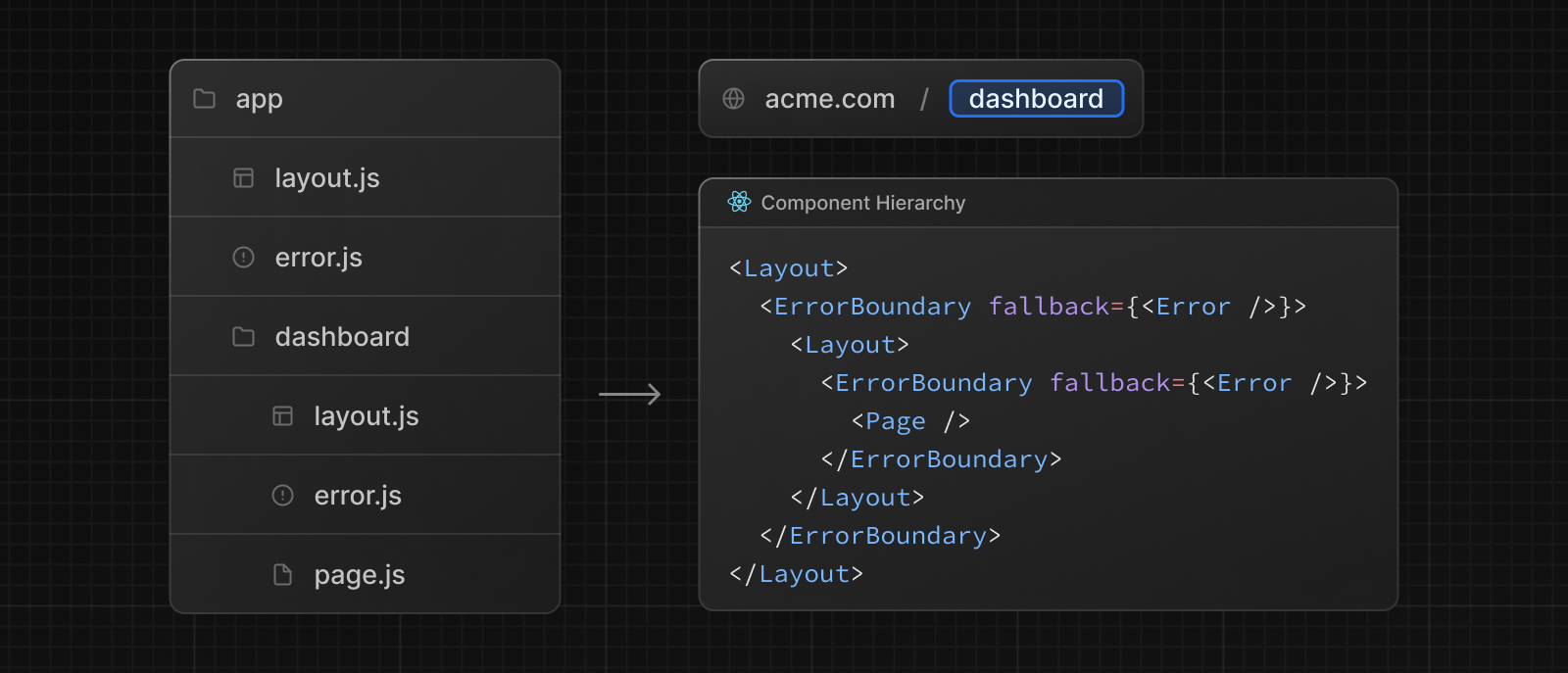
Para a recuperação de erros em nível de componente, a função catchError permite criar error boundaries que podem envolver qualquer parte da árvore de componentes:
'use client'

import { catchError, type ErrorInfo } from 'next/error'

function ErrorFallback(props: { title: string }, { error, retry }: ErrorInfo) {
  const message = error instanceof Error ? error.message : String(error)

  return (
    <div>
      <h2>{props.title}</h2>
      <p>{message}</p>
      <button onClick={() => retry()}>Try again</button>
    </div>
  )
}

export default catchError(ErrorFallback)'use client'
import { catchError } from 'next/error'
function ErrorFallback(props, { error, retry }) {
const message = error instanceof Error ? error.message : String(error)
return (
<div>
<h2>{props.title}</h2>
<p>{message}</p>
<button onClick={() => retry()}>Try again</button>
</div>
)
}
export default catchError(ErrorFallback)Depois, use o componente retornado para envolver qualquer layout ou página:
import ErrorBoundary from './custom-error-boundary'

export default function Component({ children }: { children: React.ReactNode }) {
  return <ErrorBoundary title="Dashboard Error">{children}</ErrorBoundary>
}import ErrorBoundary from './custom-error-boundary'
export default function Component({ children }) {
return <ErrorBoundary title="Dashboard Error">{children}</ErrorBoundary>
}Error boundaries não capturam erros dentro de manipuladores de eventos. Eles foram feitos para capturar erros durante a renderização e mostrar uma interface de fallback em vez de derrubar o app inteiro.
Em geral, erros em manipuladores de eventos ou em código assíncrono não são tratados por error boundaries, porque são executados depois da renderização.
Para tratar esses casos, capture o erro manualmente e armazene-o com useState ou useReducer, depois atualize a interface para informar o usuário.
'use client'

import { useState } from 'react'

export function Button() {
  const [error, setError] = useState(null)

  const handleClick = () => {
    try {
      // do some work that might fail
      throw new Error('Exception')
    } catch (reason) {
      setError(reason)
    }
  }

  if (error) {
    /* render fallback UI */
  }

  return (
    <button type="button" onClick={handleClick}>
      Click me
    </button>
  )
}
Observe que erros não tratados dentro de startTransition, do useTransition, vão se propagar até o error boundary mais próximo.
'use client'

import { useTransition } from 'react'

export function Button() {
  const [pending, startTransition] = useTransition()

  const handleClick = () =>
    startTransition(() => {
      throw new Error('Exception')
    })

  return (
    <button type="button" onClick={handleClick}>
      Click me
    </button>
  )
}
Erros globais
Embora sejam menos comuns, você pode tratar erros no layout raiz usando o arquivo global-error.js, localizado na pasta raiz do app, mesmo ao usar internacionalização. A interface de erro global precisa definir suas próprias tags <html> e <body>, já que ela substitui o layout ou template raiz quando está ativa.
'use client' // Error boundaries must be Client Components

export default function GlobalError({
  error,
  retry,
}: {
  error: unknown
  retry: () => void
}) {
  return (
    // global-error must include html and body tags
    <html>
      <body>
        <h2>Something went wrong!</h2>
        <button onClick={() => retry()}>Try again</button>
      </body>
    </html>
  )
}'use client' // Error boundaries must be Client Components
export default function GlobalError({ error, retry }) {
return (
// global-error must include html and body tags
<html>
<body>
<h2>Something went wrong!</h2>
<button onClick={() => retry()}>Try again</button>
</body>
</html>
)
}Referência da API
Saiba mais sobre os recursos mencionados nesta página lendo a Referência da API.